
Open source · Self-hosted
About Grid
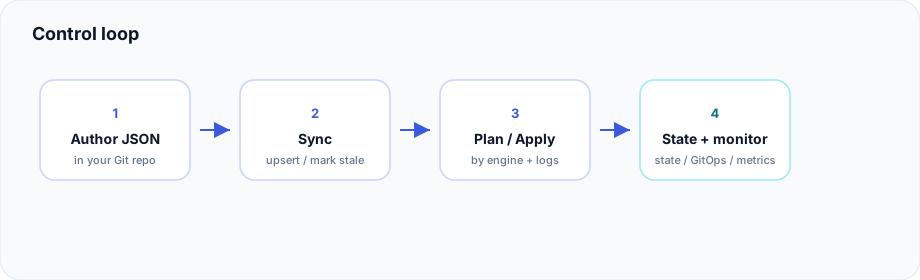
Grid is a self-hosted control plane. You describe what should exist as JSON in Git — a project, a cloud, an environment, and a unit. Grid syncs that tree and runs plan, apply, and destroy the same way on every cloud. Each cloud has its own catalog of what Grid can build there.
What Grid is for
Organizations use Grid when they want:
- Intent you own — the JSON lives in a Git repository you control.
- One release path — plan, apply, and destroy, with audit and live logs, for every cloud and every engine.
- A catalog per cloud — the path shape is the same; the types Grid builds are that cloud’s catalog. See provider catalogs.
- An exit ramp — generated Terraform and your Git history stay usable with ordinary tools. See Exit ramp.
Engines
| Engine | Operates |
|---|---|
| Terraform | Cloud resources, managed clusters, node pools, and other module-bank subtypes |
| Kubernetes workloads | In-cluster apps via GitOps (Argo CD / OpenShift GitOps) — Kubernetes workloads |
Managed clusters are Terraform units. Workloads inside those clusters are the separate kubernetes engine. Details live in the sidebar under Concepts.
What Grid is not
| Not this | Because |
|---|---|
| A hosted SaaS | You run grid-core and grid-ui on your own VM or Compose host |
| A replacement for Terraform or Argo | Grid runs them. Terraform units become HCL. Kubernetes units become cluster GitOps |
| Automatic destroy when JSON is deleted | A missing file is marked stale. Destroy is a separate release |
How it works
Your Git repo (intent JSON)
        │
        ▼
  GitOps Sync (grid-core)
        │  upsert units · mark missing JSON as stale
        ▼
  Console / API / CLI
        │  plan · apply · destroy (releases)
        ▼
  Engine:
    · terraform   → generate + module bank → remote state + archive/
    · kubernetes  → cluster GitOps (Argo / OpenShift)
        │
        ▼
  Optional host Prometheus / Alertmanager
That loop is the product. RBAC, approvals, Sources, Monitoring, and Topology wrap it. Use the sidebar for layout, unit JSON, clouds, install, and the rest — this page is the orientation.
Who does what
| Actor | Responsibility |
|---|---|
| Operators / platform | Install Core + UI, remote state, module bank pin, Git remote, auth bootstrap, and cluster GitOps connectivity for workload units |
| App / infra authors | Own the intent repository; open PRs for JSON (and workload) changes |
| Approvers | Gate apply/destroy where environment policy requires it |
| CLI users | Same generate/plan/deploy path on a local machine with cloud credentials (Grid AuthZ is not applied to raw CLI) |
Where to go next
StartQuick startStand up Grid, Sync, then Plan.ArchitectureControl planeUI, Core, CLI, module bank, and your Git remote.EnginesKubernetes workloadsGitOps CD beside Terraform — gated, documented.PortabilityExit rampLeave with Terraform and/or cluster GitOps — no lock-in.CloudsProvider catalogsWhat Grid builds on each cloud.OperateInstallCompose, VM, state, credentials, configuration.StatusRoadmapWhat is shipped, hardening, and still upcoming.